

A chair can be item CH-104 in an interior layout, CH-014 in a quotation, “lounge chair” in a sample log and Package 7 on a packing list. Each document may look complete, yet the project has no reliable answer to a simple question: are they all the same approved item?
An FF&E schedule is the controlled item register that prevents that break in identity. Each row gives one furnishing item or controlled variant a stable code, location and quantity basis; links it to the current technical and approval evidence; and exposes its latest authorized state.
The schedule is not valuable because it contains many columns. It is valuable because every drawing, sample, quotation, order, package label, site record and handover entry can point back to the same item lineage.
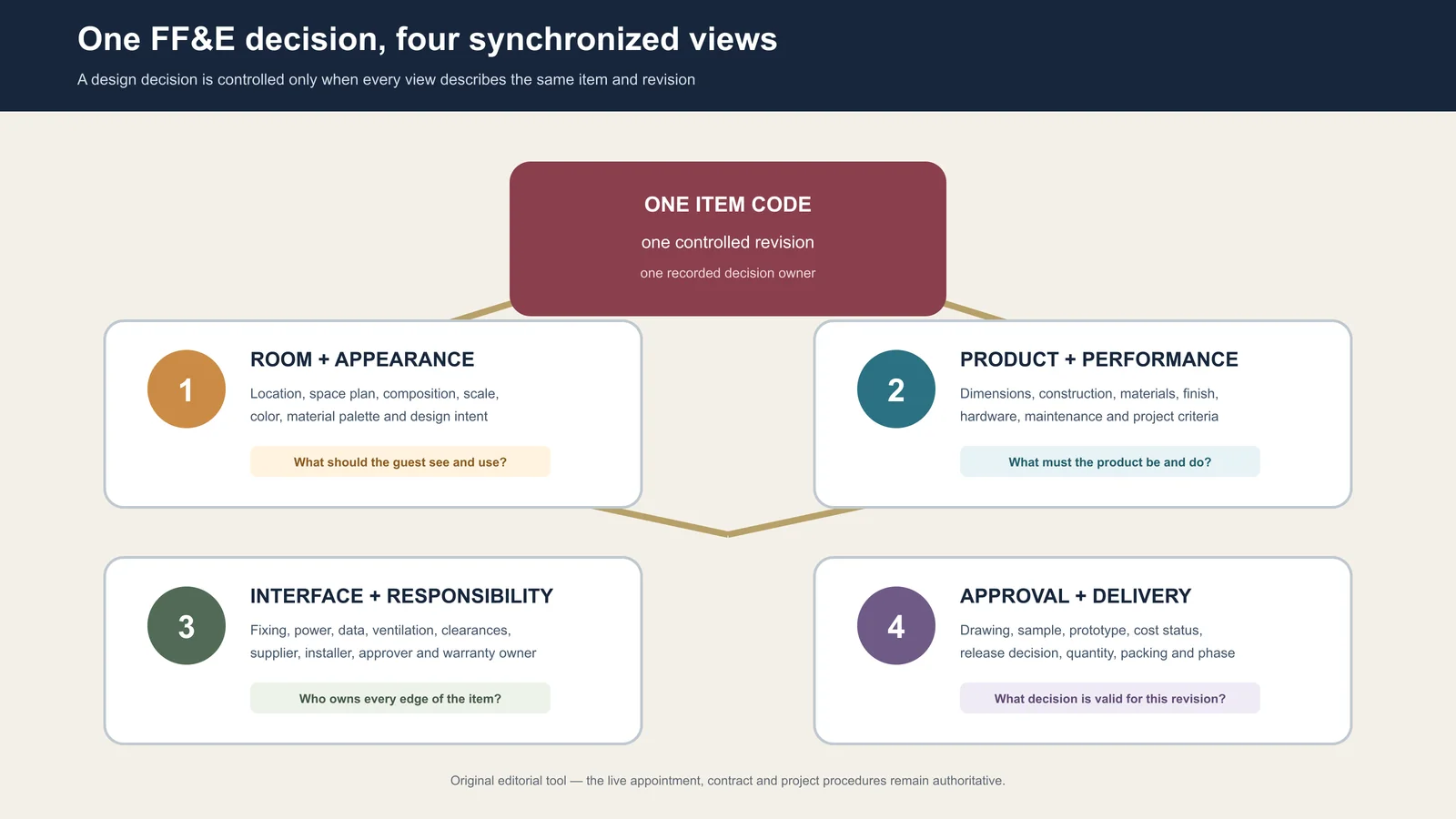
What does an FF&E schedule control?
In practice, “schedule” can mean a product-selection sheet, an item register or a timeline. For this guide, it means the item-level register. Dates and milestones can appear in it, but the project master programme remains a separate control. Likewise, the schedule should link to specifications, budgets and approval files rather than trying to replace them.
| Record | Primary question | Relationship to the FF&E schedule |
|---|---|---|
| FF&E schedule | Which item, where, how many, against which evidence, and in what state? | Holds the item identity and links the other records |
| Specification or data sheet | What must the item be, include or achieve? | Appears as a controlled document reference and revision |
| Project programme | When must coordinated activities and milestones occur? | Receives item or package milestones without becoming an item database |
| Commercial register | What has been quoted, committed, varied and paid under the authorized basis? | Reconciles through the same item and package codes; access may be restricted |
| Asset or handover register | What was accepted, where is it, and what operational information follows it? | Receives the final scheduled identity and accepted evidence |
| Depreciation schedule | How are assets treated for accounting purposes? | A separate accounting record outside this article’s intent |
Define what one row means before adding columns
The row is the grain of the schedule. If the grain is vague, totals and statuses are unreliable even when the spreadsheet is beautifully formatted.
A useful starting rule is: one row represents one base item in one controlled variant. A variant is necessary when a difference changes a decision the team must track—for example handedness, size, finish, upholstery, service interface, destination package or approval route. A color difference that shares every other decision may remain one base code plus a controlled finish variant. A minibar cabinet with a different appliance opening should normally be separated because the geometry and evidence change.
Before admitting a row, apply five checks:
- Identity: Does the item have one unique, durable code and a plain-language name?
- Placement: Can the team state the room type, room, zone or repeated location rule?
- Quantity basis: Can the count be traced to locations, repetition and authorized spares?
- Evidence: Is there a current drawing, specification, selection or other record that defines the present requirement?
- Ownership: Is one role responsible for the row and each controlled decision within it?
A placeholder may enter the schedule with open decisions, but it should not imitate a released item. Mark what is unknown, who must resolve it and which next use is blocked.
Build a stable identity spine
The fields that survive from concept to handover form the schedule’s identity spine. Keep them stable even as later views add information.
| Field group | Minimum useful fields | Control question |
|---|---|---|
| Identity | Item code, controlled variant, short name, category, package | Can every document name the same object? |
| Location | Property, building, floor, room type, room or zone rule | Can the item be counted and found? |
| Quantity basis | Units per location, location count, spares basis, current quantity states | Can every total be reproduced? |
| Technical reference | Drawing, specification or data-sheet number and revision; finish or sample reference | Which controlled evidence describes the current requirement? |
| Decision state | Status, reviewed object, authority, date, conditions and open comments | What exactly may proceed? |
| Responsibility | Field owner, transition owner and next action owner | Who can prepare, change, approve or close the data? |
| Physical lineage | Supplier item reference, batch or package code, destination and accepted location | Can the received object be traced back to the scheduled decision? |
Do not make a product image, a long description or a supplier model number the primary identity. Those values can change. The project item code should remain the durable key, with supplier and document references attached to it.
Use five views of one record, not five competing schedules
Different teams need different columns. That does not require duplicate master files. Maintain one governed record and issue role-specific views.
- Design view: item, location, composition, scale, finish direction and current design reference.
- Approval view: required evidence, submitted object and revision, reviewer, authority, decision, conditions and next action.
- Procurement view: tender package, comparable quantity, selected basis, supplier reference, commitment state and surviving exclusions.
- Delivery and installation view: package identity, destination, shipped and received quantities, zone, installation state and exception reference.
- Handover view: accepted location and quantity, final reference set, care or warranty document where contracted, spare identity and open closeout item.
Commercial access can be restricted while the item code remains shared. A site team may not need unit cost, and a designer may not need container data. Both still need the same item identity and approved revision.
Keep quantity states separate: a worked example
A single “Qty” column hides the difference between a design calculation and a physical acceptance. Use separate states when the underlying decision differs.
Consider an illustrative minibar cabinet, code CG-214. One approved room type has 18 rooms, each using one cabinet. The owner also authorizes two spares. The planned quantity is therefore:
Planned quantity = 18 rooms × 1 cabinet per room + 2 authorized spares = 20
| Quantity state | Illustrative value | Evidence needed | Do not infer |
|---|---|---|---|
| Planned | 20 | Room-type count, units-per-room rule and spare approval | That 20 has been bought |
| Committed | 20 | Authorized order or contract line tied to CG-214 | That 20 has been produced or shipped |
| Received | 19 | Receipt by package, identity, quantity and observable condition | That all 19 are installed or accepted |
| Accepted | 18 | Accepted location and closeout or exception record | That the remaining two are lost; one may be a spare and one may remain open |
The values are fictional and show the logic only. A live project may add produced, inspected, shipped, damaged, rejected, replaced or installed states. The important rule is that a later update must not overwrite the evidence behind an earlier state.
Reference dimensions and specifications; do not copy them blindly
The schedule needs enough technical data to identify and filter the item, but detailed geometry belongs in the controlled document best suited to show it. Record the drawing or data-sheet number, revision and dimension status. Distinguish design dimensions, supplier-confirmed dimensions and field-verified dimensions where the difference affects fit.
Copying every dimension, material note and construction clause into the schedule creates two editable sources. When a shop drawing changes but the copied cell does not, the row looks current while describing the wrong object.
For an interface-sensitive cabinet, the schedule might record “overall width—refer to drawing GW-CG214-05, Rev C; appliance opening—field or selected-model input pending.” The drawing holds the geometry. The schedule exposes which reference controls and which decision is still open.
Record approval as a five-part decision
“Approved” is not a self-contained status. A usable approval tuple identifies:
- Object: drawing, sample, mock-up, quotation basis or other reviewed evidence.
- Revision: the exact issue reviewed.
- Scope: the attributes covered—for example finish only, geometry only or full fabrication release.
- Authority: the named role permitted to make that decision under the project procedure.
- Condition: decision date, open comments, exceptions and the next permitted action.
A finish sample approval should not imply approval of dimensions, hardware or construction. A reviewed drawing should not silently approve an unshown material. Store each decision against the relevant evidence and let the consolidated item state reflect only the actions that are actually permitted.
Change the schedule through a delta record
Do not correct a released row by quietly replacing its old value. Preserve the last controlled baseline and issue a delta that records:
- item code and affected variant or locations;
- field changed, previous value and proposed value;
- reason and originating instruction or evidence;
- decision owner and authorization status;
- affected drawing, sample, quantity, commercial, package and handover views;
- effective revision and date;
- actions required to reconcile work already quoted, made, shipped or installed.
This delta is an editorial planning tool, not a substitute for the formal instruction or contract change. Its purpose is to stop one cell edit from becoming an invisible contradiction across five working views.
Assign owners to fields and state transitions
“The designer owns the schedule” is too broad. The designer may own item identity and design references, procurement may own commercial fields, the manufacturer may prepare shop-drawing and production updates, logistics may update custody, and the site or owner team may record acceptance. The appointment and project procedure decide the actual roles.
For each controlled field group, name who may prepare it, who verifies it and who authorizes a state change. Then name the transition owner. Moving an item from “sample submitted” to “finish approved” is a decision; moving it from “approved” to “released for production” may be a different decision with a different authority.
Use controlled status values with written definitions. Avoid color as the only signal and avoid phrases such as “nearly approved.” A useful state must tell another team what can happen next.
Run three reconciliations before issuing the schedule
- Location-to-quantity: Recalculate totals from room types, zones, repeated locations and spares. Investigate every manual override.
- Evidence-to-state: Test whether the current drawing, specification, sample and approval records support the published item state.
- Digital-to-physical: Select received or installed items and confirm that package labels, locations and exception records resolve to the scheduled code and variant.
A schedule can pass one test and fail another. The room count may be correct while the drawing revision is stale. The delivery count may reconcile while three pieces have the wrong variant. Record each failure as a named exception instead of forcing the row to display a reassuring green status.
Close the lineage at handover
Handover should not create a new asset identity. Carry the scheduled code into the accepted location and connect the final approved reference, accepted quantity, outstanding exception, care information, spare code and warranty document where these are part of the contracted deliverables.
Close a row only when the project’s completion rule is observable. “Installed” may mean placed in the correct room; “accepted” may require inspection and closed exceptions; “closed” may require documents and spare information. Define those meanings before site reporting begins.
What should you send Gainwell for a schedule review?
Gainwell’s current product directory covers custom loose furniture, casegoods, seating, tables, outdoor and specialty products, plus architectural millwork and fixed furniture. Its public capabilities workflow describes shop drawings, material and finish coordination, prototypes or samples, manufacturing checkpoints, inspection records, project coding, packaging and delivery support.
Those are company-level capabilities, not an automatic scope for every project. For a useful review, provide the current item schedule, room and area counts, drawing and specification index, dimension status, finish direction, approval route, destination and the exact technical, manufacturing or delivery responsibilities you want assessed.
Start with one representative repeated item and its controlled variant rather than sending an unqualified workbook. Share the FF&E schedule and project brief with Gainwell so the team can confirm which inputs, deliverables and services fit the live proposal.